![Firefly-logo-high-res.png]](https://fireflyreservations.com/hs-fs/hubfs/Firefly-logo-high-res.png?height=50&name=Firefly-logo-high-res.png)
Last updated: June 9, 2026
Link to Feature: https://app.fireflyreservations.com/units (or click here)
Quick Links
Reservation Changes with Dynamic Rates
Overview
Firefly offers dynamic rates to help you maximize your property's revenue. These special rates apply based on real-time occupancy, allowing you to increase prices as demand increases and lower prices to more competitive or attractive rates when demand is low. You may even set your dynamic rates to evaluate the occupancy of your entire property or the unit's class. This flexibility allows you to fine tune your pricing so you have more control over profitability and competitiveness.
Dynamic Rate Setup
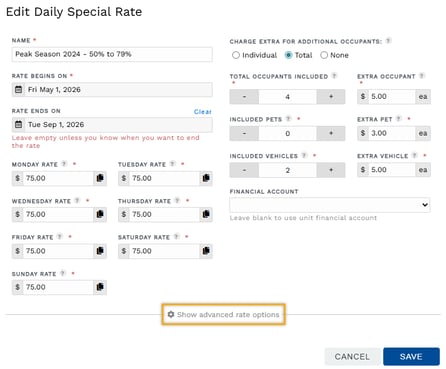
The settings for dynamic rates are available when viewing advanced rate options on special rates.
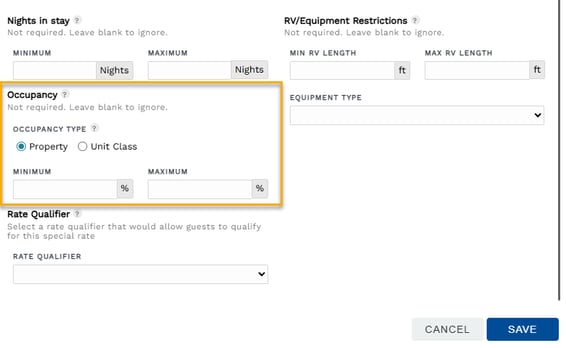
In the Occupancy section, you will select the evaluation method by choosing the Occupancy Type: Property or Unit Class. The Minimum and Maximum fields are the occupancy percentages the rate will apply to.
Dynamic Rate Calculations
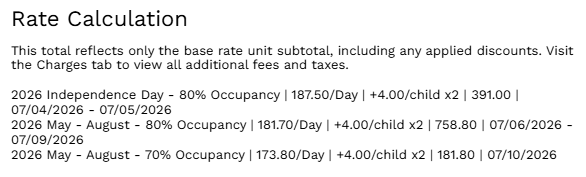
Rate Calculation pop-ups allow you to confidently identify the rate being applied to a stay. This is especially helpful for properties utilizing dynamic rates, as the rate for each unit stay is uniquely calculated based on the occupancy at the time of booking.
Below is a Rate Calculation example, a good visual for how the system automatically selects multiple rates based on the occupancy throughout a stay or other factors set in a special rate, like holidays and special events.
TIP: Rate calculations are available on the New Reservations page and in a unit's details. If you are not yet familiar, you may learn more here: How can I see the rate Firefly used?
Reservation Changes with Dynamic Rates
Making changes to a reservation may lead to a recalculation of the reservation unit's rates. Below is the expected rate behavior for unit's utilizing dynamic rates. It is essential to know that the system stores the occupancy for the property and each unit class at the time of booking for the unit's stay dates. This drives the following recalculations:
- move to new unit, same stay dates: booking occupancy on rate of the new unit
- shorten a stay: booking rates
- extend a stay: booking rates for original dates with current rates for additional night(s)
- change to all new dates: current rates
- move to new unit and change to new dates: current rates on the new unit