![Firefly-logo-high-res.png]](https://fireflyreservations.com/hs-fs/hubfs/Firefly-logo-high-res.png?height=50&name=Firefly-logo-high-res.png)
Last Updated: April 9, 2026
Link to Feature: https://app.fireflyreservations.com/Users (or click here)
TIP: Need to add a user or update permissions? See: Managing User Profiles in Firefly
Permission Definitions
-
Accounting
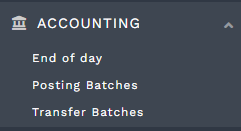
- Accounting Procedures - features in the Accounting dropdown
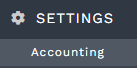
- Accounting Settings - accounting setup accessed through the Settings dropdown
- Accounting Procedures - features in the Accounting dropdown
-
General
- Account Administrator - includes access to user profiles and billing information
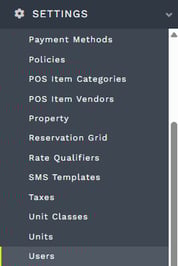
- Management of user profiles, accessed by going to main menu > Settings > Users.
- Account Manager settings, accessed by selecting Account from the user profile dropdown in the upper right. This includes managing additional properties, payment method on file for park invoices, integration add-ons like SMS messaging as well as OTAs and InexTech gate and visitor management, and park invoices for Firefly services. Users with this permission will receive park invoices to the email address on file.


- Users with account administrator permission receive park invoices, at the email address in their user profile.
- Management of user profiles, accessed by going to main menu > Settings > Users.
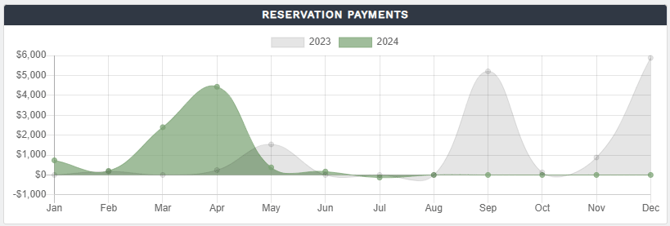
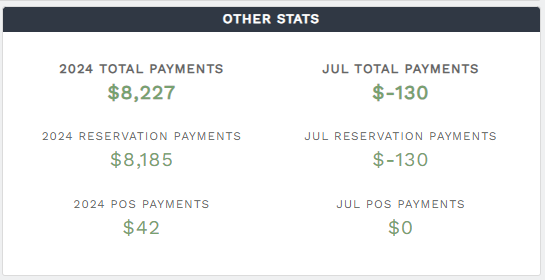
- Dashboard Revenue - displays Reservation Payments and Other Stats on Dashboard
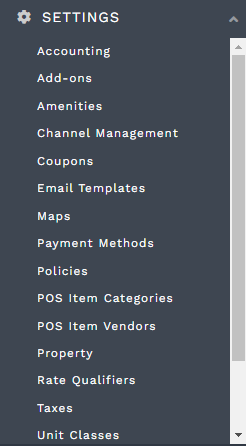
- Manage Settings - all items in Settings dropdown except Users, which is under the Account Administrator permission.
- Account Administrator - includes access to user profiles and billing information
-
Property
- Block Units/Unit Groups - block a unit from the grid or unit settings or create a new Blocked Unit Group to block multiple units in a bulk action
-
Reservation Management
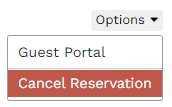
- Cancel Reservation - Options dropdown in the upper right corner of a reservation
- Delete a Charge/Recurring Charge
- Delete a Payment
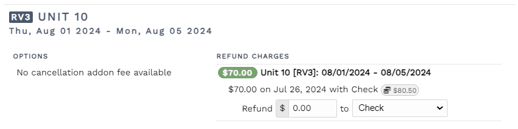
- Edit Cancellation Refund Amounts/Methods - this enables staff to make changes to refund amounts when processing a cancellation
- Edit Charges/Recurring Charges
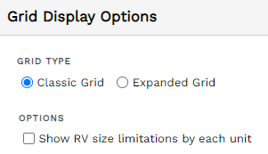
- Reservation Grid Settings Management - select default grid and information displayed
- Refund a Payment
- Reservation Credit Adjustment
- Cancel Reservation - Options dropdown in the upper right corner of a reservation
-
Reporting
You may share permissions to the reports listed below individually. For more information about each report, see Firefly Reports Explained.
- Reports (ALL)
- Accounts Receivable Balance
- Accounts Receivable Balance Summary
- Add-ons Sold
- Add-on Rentals
- Add-on Visitors
- Add-on Rentals Summary
- Arrivals
- Avg Daily Revenue by Unit
- Billable Reservations
- Billable Long-Term Reservations
- Blocked Units
- Charge Payments
- Charges
- Coupon Usage
- Coupon Usage Summary
- Deferred Revenue Balance
- Deleted Charges
- Departures
- Deposit Balance Summary
- Deposit Summary
- Group Hold Reservations
- Guests
- InexTech iZCloud Active Access List
- Journal Entries
- Journal Entries Summary
- Lock Fees
- Occupancy Summary
- Occupants
- Overdue Charges
- Payments
- Payments - Export ACSS
- POS Inventory
- POS Inventory History
- POS Items Sold
- POS Items Sold Summary
- POS Payments
- POS Transactions
- Rates
- Record Utilities
- Recurring Charges
- Revenue by Unit
- Referral Sources
- Rent Roll
- Reservations
- Reservation Charges
- Reservation Credits
- Reservation Created Summary
- Reservation Duration Summary
- Reservation Guests
- Reservation Guests & Visitors
- Reservation Guests & Visitors (Vehicles)
- Reservation Portal Searches
- Reservation Taxes
- Reserved Units
- Revenue Summary
- Taxes Collected
- Total Revenue
- Unit Occupancy
- Units
- Unpaid Charges
- Updated Charges
- Utility Readings
- Emails (Reservation)
- Emails (Non-Reservation)
- SMS Messages
🙋♀️ Still need help? Email: support@fireflyreservations.com and one of our technicians can help answer your questions.
💭 We would love to know if this article was helpful in addressing your issue. If you could answer the question below it will notify our team. Thank you!