![Firefly-logo-high-res.png]](https://fireflyreservations.com/hs-fs/hubfs/Firefly-logo-high-res.png?height=50&name=Firefly-logo-high-res.png)
Last Updated: February 9, 2026
Link to Feature: https://app.fireflyreservations.com/paymentmethods (or click here)
Quick Links
Alternative Payment Method Setup
Accept Payments from Alternative Payment Methods
Document Offline Payment Activity from Alternative Payment Method
Overview
At some point, many parks find it necessary to take or consider payments from sources other than their payment processor integrated in Firefly. We refer to these as "alternative payment methods" because they are offline, occurring outside of Firefly. However, the system is designed for you to fully customize the payment methods you accept so you have endless possibilities for your guest's payments. A few examples of the most popular alternative payment methods are PayPal, Venmo, and Cash App.
Before jumping to the setup of an alternative payment method, we must cover the difference between your Firefly initiated payments and those that occur in an outside system or from another source.
Online vs Offline Payments
Online payments and refunds are initiated in Firefly through an integrated payment processor. They are payments on the reservation portal or guest portal. Payments initiated through Firefly using a card terminal, manual entry, or a payment method on file. Also, as bank transfers are only available if a payment processor is integrated in your system, these are online transactions as well.
Offline transactions are not actually processed through your integrated payment processor in Firefly. These offline payments and refunds are simply recorded in Firefly for documentation purposes only. They allow you to accept payments and give refunds in another system then document in Firefly that payment activity.
TIP: To learn more about the differences between online and offline transactions, see: Online vs Offline Payments/Refunds.
Alternative Payment Method Setup
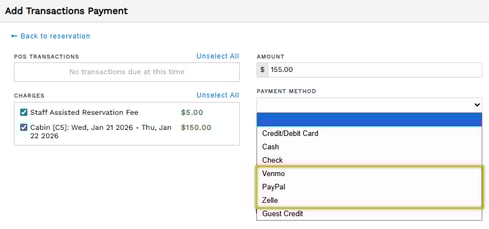
When taking a payment, you may not see payment methods like Venmo, PayPal, or Zelle. This is because the payment method has been hidden or renamed. Thankfully, like most things in Firefly, it only takes a few clicks to customize the payment methods you wish to accept. It's quick and easy to unhide a hidden method or rename methods as needed to achieve your desired payment options.
From the main menu, click the Settings dropdown then select Payment Methods.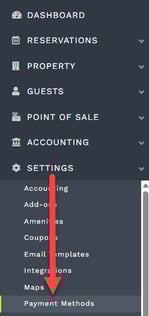
Here you will see a list of all 10 payment methods and their management settings. Click a method's 3 dots then select Edit to make changes.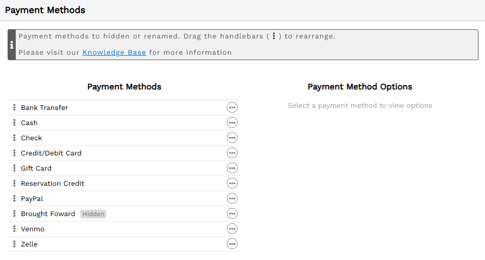
TIP: To learn more about all your customization options, check out: How do I change Payment Method options?.
Accept Payments from Alternative Payment Methods
To accept payments from an alternative payment method you would...
-
Create an account in the desired system, if you do not already have one.
-
Send your guest a request to pay within that system or share your account information and desired payment amount with your guest so they can identify you in the system and send you a payment.
-
If you would like to use Firefly to send your guests the steps to pay through an you can create a custom email template or a custom SMS template, or you may customize an existing one.
NOTE: You may find information through YouTube or a web search to guide you with the steps above. These can be great resources. However, each respective payment vendor's website and Support resources are your best option for the most accurate information to create an account, request a payment, or receive funds from their system.
Since alternative method payments occur outside of Firefly, our team can only assist with documenting the offline activity in Firefly. We can not guide you with the details of creating a payment vendor's account, requesting or accepting a payment in the outside system, or receiving funds from the payment vendor's transactions.
Document Offline Payment Activity from Alternative Payment Method
Documenting payment activity that occurred in a system outside of Firefly is the same process as recording a cash or check payment. Once you have your alternative payment method setup, you simply select the appropriate system as the payment method when making a payment in Firefly.
IMPORTANT: It's essential to remember recording an offline transaction in Firefly does not initiate any payment or refund activity in another system. This action is strictly for documentation purposes, so Firefly's records and reports remain accurate with all financial transactions.