![Firefly-logo-high-res.png]](https://fireflyreservations.com/hs-fs/hubfs/Firefly-logo-high-res.png?height=50&name=Firefly-logo-high-res.png)
Last Updated: February 11, 2026
Link to Feature: https://app.fireflyreservations.com/Settings#reservations (or click here)
Quick Links
Update Reservation Portal Settings
Unit Selection for Bookings by Unit Class
Overview
If your park wants to hide the unit number from a guest when booking, this can be set up in Property Settings. Enabling this feature will have guests select the type of unit they are booking instead of a specific unit. Once you have enabled this, you then want to update your email templates to not include unit numbers. All steps are found below.
Update Reservation Portal
1. Click the Settings option on the main menu
2. Click Property Settings
3. Click on the Reservation Tab
4. Scroll down a bit until you see the "Search Results" section
5. Check the box next to "Allow guests to only view and book by unit class, not unit number 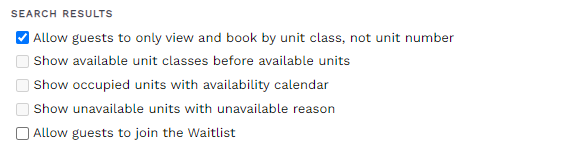
Update Email Templates
If your guests are booking by unit class instead of unit number, you want to ensure your email templates do not share a unit number. Some email templates send out the unit number by default and you may have even added the unit number to other templates.
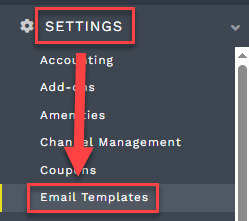
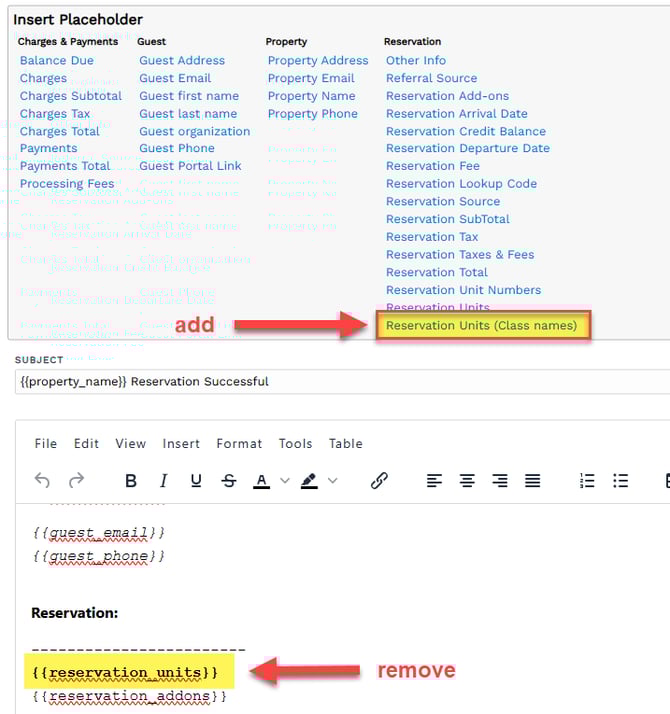
You will go to Settings on the main menu and select Email Templates. Here you see all templates in your system and can click on a template to open it. Edit the text to remove the unit number placeholder and add the placeholder for unit class. Click Save and your template will update for future reservations.
- Click the Settings dropdown on the main menu, select Email Templates.
- Click on a template's hyperlink to open it.

- Remove the reservation units placeholder then insert the reservation units (unit class) placeholder.
- Save your changes to update all future emails for this template.
For more information on emails and email templates, check out Customizing Email Templates.
💡Tip: We recommend checking these emails templates as they contain the reservation unit by default, also check any others that may have been previously edited to include the reservation units placeholder:
- New Reservation
- Reservation Pre-Arrival 1
- Reservation Pre-Arrival 2
- Upcoming Reservation
- New Past Reservation
- Reservation Cancelled
- Reservation Conflict.
Booking by Unit Class
Reservation Portal
When your park hides unit numbers from guests booking on the reservation portal, an availability search immediately shows unit classes the guest may select from.
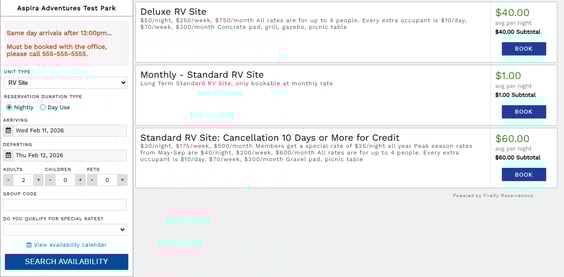
The booking process remains regardless if the guest selects a unit class or specific unit. As guests proceed through the steps of booking, any time a specific unit would be mentioned, guests are presented with the unit class name. To ensure the Reservation Success message and Reservation Success confirmation email guests receive will also
Front Desk
Staff using the front desk to book reservations will notice no change. A unit must always be selected to complete a front desk booking.
The unit class booking restriction only applies to guest's booking on the reservation portal.
Unit Selection for Bookings by Unit Class
When a guest books by unit class on the reservation portal, Firefly will assign the first available unit in the selected unit class. This is determined by your unit order on the Units page. You can confirm or manage your unit order by going to Settings > Units > Arrange Units.
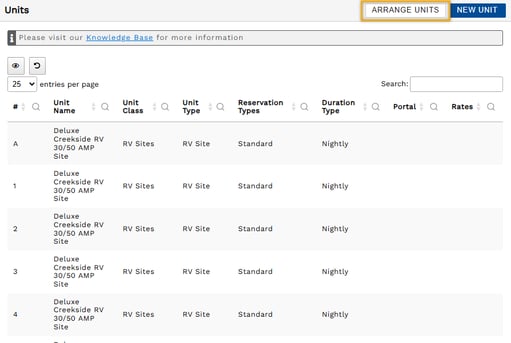
TIP: For a full walkthrough, check out: Quickly Update Name, Number, and Order of Units.
🙋♀️ Still need help? Email: support@fireflyreservations.com and one of our technicians can help answer your questions.
💭 We would love to know if this article was helpful in addressing your issue. If you could answer the question below it will notify our team. Thank you!