![Firefly-logo-high-res.png]](https://fireflyreservations.com/hs-fs/hubfs/Firefly-logo-high-res.png?height=50&name=Firefly-logo-high-res.png)
Last Updated: February 5, 2026
Link to Feature: This built in Firefly feature is accessible through your reservation portal URL.
Quick Links
Overview
Firefly's reservation portal includes a handy tool called the availability calendar. This tool is available for park-wide availability and allows your guest to quickly see a calendar that shows when you have units available. If your campground stays fairly full, this would prevent the need for a guest to search by date until they find a date range with available units. They can simply look at the calendar to see what date range is available.
There are two types of availability calendars: the property calendar and the unit calendar.
Property Availability Calendar
The property availability calendar allows the guest to view a calendar to see when there is any unit available that matches the unit type and occupancy select in the search pane.
To view the calendar, open your reservation portal and click the View availability calendar link right above the Search Availability button.
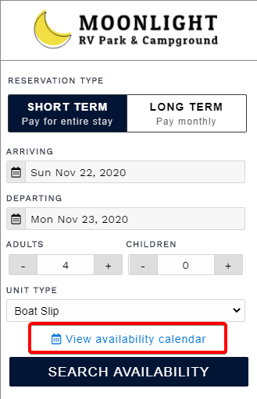
Click View availability calendar to show the calendar
This will display the calendar starting with the current month. You can click the arrows to view future months. Each day will display the number of available units in green or yellow. Yellow indicates there are not many available. Days where there are no units available will show 0 with a red bar to indicate that range is unavailable.
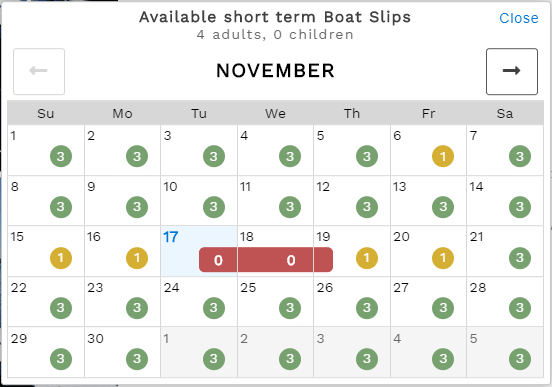
Property availability calendar
Unit Availability Calendar
The unit availability calendar is similar except it only shows the availability for a specific unit.
When a guest clicks Search Availability from the main search pane, the guest will see a list and/or interactive map showing all available and unavailable units. If a unit is unavailable because it is occupied, the guest can click Show Availability to see the availability calendar for that unit only.
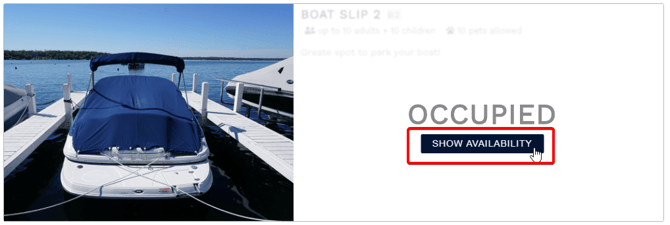 Click Show Availability to see the Availability Calendar for that unit only.
This will display the Availability Calendar for that specific unit, which shows all available days with a green check and unavailable days with a white X in a red bar.
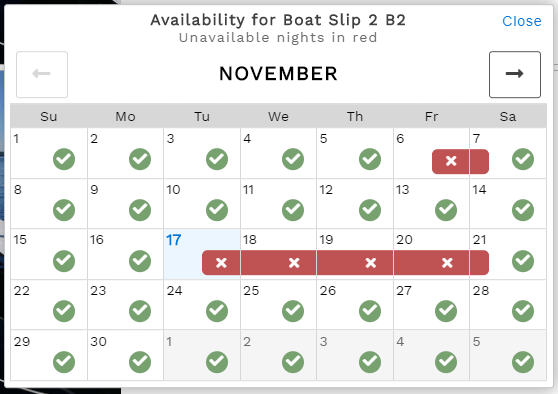
Availability Calendar for the specified unit only.
If the guest really would prefer a specific unit that is occupied for the date range they searched for, this allows them to adjust their dates to a date range they can see is available in order to secure that specific unit.
🙋♀️ Still need help? Email: support@fireflyreservations.com and one of our technicians can help answer your questions.
💭 We would love to know if this article was helpful in addressing your issue. If you could answer the question below it will notify our team. Thank you!