![Firefly-logo-high-res.png]](https://fireflyreservations.com/hs-fs/hubfs/Firefly-logo-high-res.png?height=50&name=Firefly-logo-high-res.png)
Last Updated: June 12, 2026
Link to Feature: https://app.fireflyreservations.com/Guests/Guest (or click here)
Quick Links
Overview
Guest Profile
Reservation Portal Bookings
Front Desk Bookings
Overview
On a guest profile, the contact fields for address and phone number default to United States standard format if an alternative country is not selected. When entering information for a new international guest, selecting the country of residence first changes the format allowance of the remaining contact information fields. The phone number field is extended to allow extra numbers, and the postal code field will accept letters as well as numbers.
The collected guest information is the same for a new guest profile throughout the system: guest profiles, guests booking online on the reservation portal, and staff booking a reservation internally on the front desk. To help you become familiar, below are screenshots of each interaction with a guest profile in Firefly.
Guest Profile
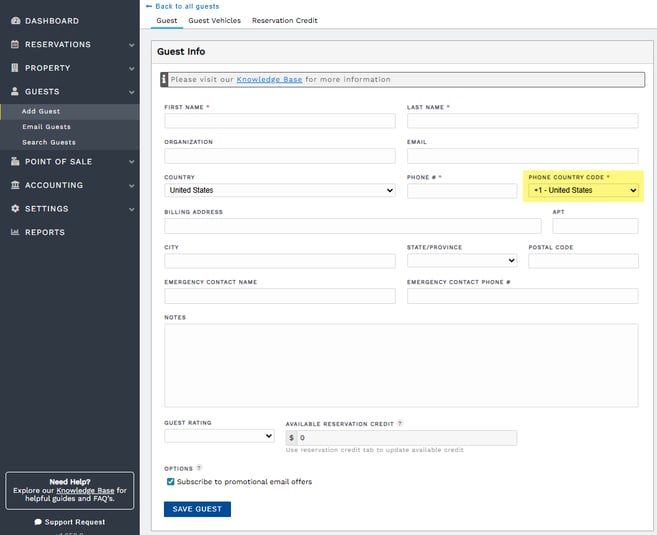
Going to Guests > Add Guest on the main menu allows you to enter information for a new guest without having to book a reservation at that time. In the screenshot below, we see this page displays a field for Phone County Code which defaults to +1 for United States.
Click the dropdown and select the appropriate county for a guest from outside the US.
Reservation Portal Bookings
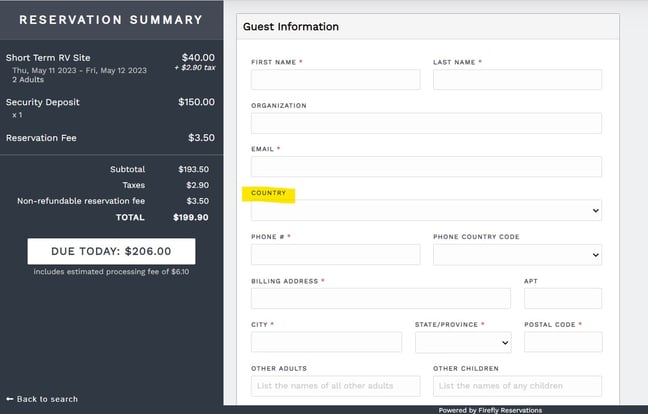
Guests booking a self-serve reservation online, on a property's reservation portal, have the ability to specify the country of residence in the County field on the Guest Information page at the end of the booking process.
When a country is selected, the Phone Country Code will automatically populate.
Front Desk Bookings
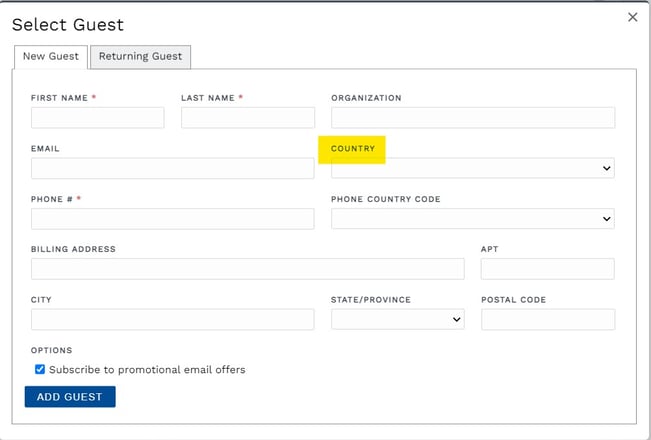
Similar to guests booking on the reservation portal, staff taking reservations over the phone or in-person will also first select the appropriate country in the County field when creating a new booking on the front desk.
When a country is selected, the Phone Country Code will automatically populate.
🙋♀️ Still need help? Email: support@fireflyreservations.com and one of our technicians can help answer your questions.
💭 We would love to know if this article was helpful in addressing your issue. If you could answer the question below it will notify our team. Thank you!